Release BadgeMaker 2.12 available now

image

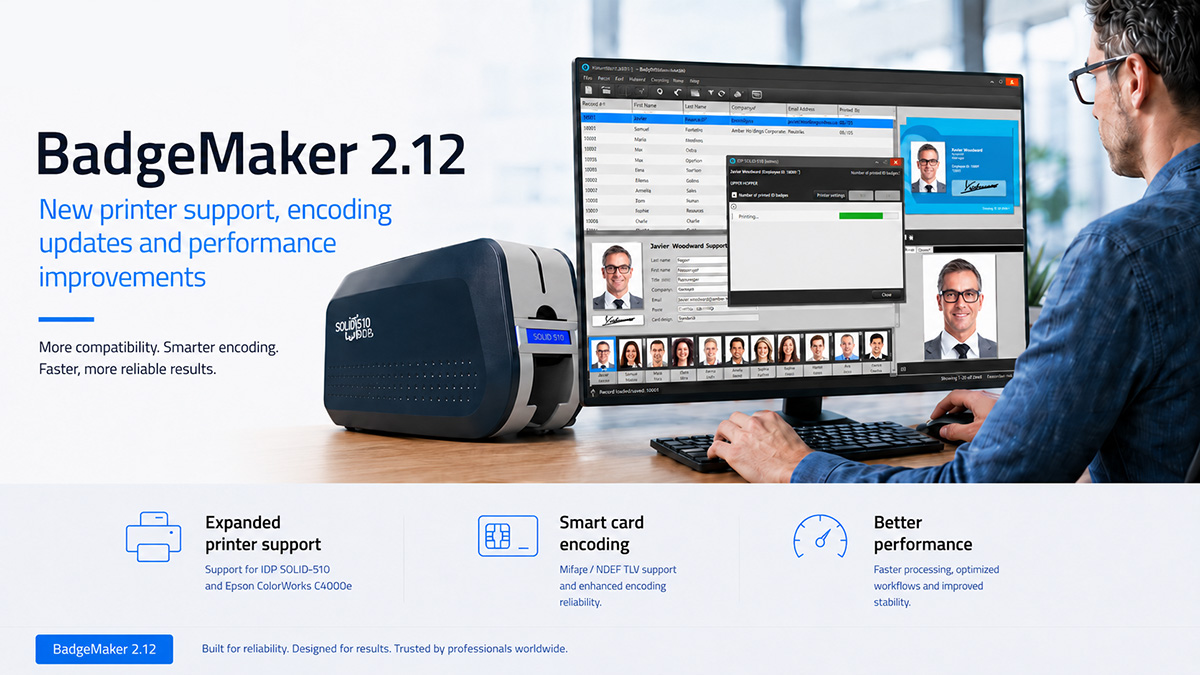
The latest BadgeMaker release expands printer and encoding support while improving performance, compatibility and reliability.
BadgeMaker 2.12 is now available. This release introduces support for additional card printers, a label printer, new smart card encoding options and several improvements to existing printing, database and encoding workflows.

Expanded printer support

BadgeMaker 2.12 adds support for the IDP Smart-81 card printer and introduces SLE encoding support for the IDP SOLID-510.

The release also adds support for printing foldable labels with the Epson ColorWorks C4000e. This makes it possible to design and print the front and back of foldable event badge labels (Expobadge labels).

Printing reliability and performance have also been improved:

  • Faster printing for Zebra printers when no encoding is required
  • Improved print-job status checking for the Magicard Rio Pro
  • Corrected 600-dpi printing with the Zebra ZXP Series 9
  • Restored required components for Dascom printer support
New encoding capabilities

BadgeMaker 2.12 introduces several new encoding options:

  • Support for NTag encoding using Elatec TWN4 readers
  • Support for NDEF TLV blocks
  • SLE encoding support for IDP SOLID-510 printers
  • An additional error-handling setting for dynamic data encoding

The firmware version check for Elatec TWN4 readers has also been improved, and an issue affecting the detection of certain single-slot Omnikey contactless readers has been resolved.

Additional improvements

Several reliability and compatibility improvements are included in this release:

  • Interleaved 2 of 5 barcodes now automatically receive a leading zero when an uneven number of digits is entered
  • Improvements to Oracle database connectivity
  • Improved compatibility with Microsoft Access databases and the Microsoft Office 365 Runtime
  • Prevention of duplicate record IDs in external tables without a uniqueness constraint
  • Correct loading of bitfield content from CCI files
Update to BadgeMaker 2.12

We recommend updating to BadgeMaker 2.12 to benefit from the latest printer support, encoding capabilities and reliability improvements.

BADGEMAKER RELEASE NOTES VERSION 2.12:

Features

  • Added a card size preset for ExpoBadge 260 labels in BadgeMaker Design.
  • Added SLE encoding support for IDP Solid 510 printers.Added support for printing foldable labels with Epson ColorWorks C4000e label printers.
  • Added support for NDEF TLV blocks.
  • Added an extra error handling setting for dynamic data encoding.
  • Added support for IDP Smart-81 printers.
  • Added support for NTag encoding with Elatec TWN4 card readers.

🔹 Improvements in 2.12

  • Improved Interleaved 2of5 barcodes: a 0 is now automatically prepended if the number of digits is uneven in BadgeMaker Design.
  • Improved Elatec TWN4 firmware version check.

🔹 Improvements in 2.11.23

  • Improved reliability of print job status checking for Magicard Rio Pro printers.
  • Fixed that some files required for Dascom printing were missing.
  • Fixed that certain single-slot Omnikey card readers were no longer detected as contactless readers.

🔹 Improvements in 2.11.21

  • Fixed that images were cut off when printing with a 600-dpi ZXP9 printer.
  • Fixed that bitfield content in CCI files wasn’t loaded correctly.

🔹 Improvements in 2.11.20

  • Improved Interleaved 2of5 barcodes: a 0 is now automatically prepended if the number of digits is uneven.
  • Improved printing throughput for Zebra printers for print jobs without encoding.
  • Potential fix for an Oracle database connection problem.
  • Fixed a crash and several errors when trying to open an MS Access database in combination with the Microsoft Office 365 Runtime.
  • Fixed that it was possible to add records with duplicate IDs in external tables, if their ID column didn’t have a uniqueness constraint.
Read More

Update Release BadgeMaker 2.11.18

image

ScreenCheck is pleased to introduce BadgeMaker 2.11.18, the latest update in our ongoing commitment to deliver professional, reliable, and user-friendly card personalization software. With every release, we focus on strengthening the way you design, manage, print, and encode ID cards, ensuring BadgeMaker continues to meet the needs of organizations worldwide.

This version brings important new features such as support for encoding large numbers, selective UHF Gen2 encoding, and better project management safeguards. It also addresses issues with data import/export, MS Access integration, printer compatibility, and project creation — resulting in a more stable and efficient workflow.

Recent updates in 2.11.17 and 2.11.16 also introduced valuable enhancements, including improved print quality for Zebra printers, support for Authentys Pro 300 printers, and multiple fixes related to encoding reliability, Excel data handling, project stability, and magstripe encoding with Fargo printers.

Together, these updates ensure BadgeMaker continues to deliver the flexibility, security, and performance you need for professional card production.

Why Update?

This series of updates further strengthens BadgeMaker’s reliability, encoding flexibility, and printer compatibility. From expanded smart card encoding options to better Excel handling and improved printer performance, BadgeMaker improves with each update.

We recommend all users update to BadgeMaker 2.11.18 to benefit from these enhancements and fixes.

BADGEMAKER RELEASE NOTES VERSION 2.11.18:

Features

  • Extended encoding support for large numbers (10+ digits).

  • Selective UHF Gen2 encoding: choose which banks to encode.

  • Confirmation dialog added when applying destructive changes in project settings.

Improvements and fixed issues

  • Fixed a data loading issue with MS Access files.

  • Fixed a date format issue when importing from Excel.

  • Fixed an issue where Excel export would fail on some systems.

  • Fixed a bug that prevented new project creation.

  • Fixed a problem where images were cut off when printing with ZC10L printers.

  • Fixed a text fragment drawing error when using non-default Windows text scaling.

  • Fixed a CCI linking issue in project settings.

  • Fixed the localization of special column names.

🔹 Improvements in 2.11.17

  • Improved print quality for Zebra printers when using transparent images.

  • Fixed encoding failures with Mifare Classic when using dynamic data elements.

  • Fixed a numeric data overflow issue when exporting to Excel.

🔹 Improvements in 2.11.16

  • Added support for Authentys Pro 300 printers.

  • Improved error handling for CX retransfer printers.

  • Fixed a magstripe encoding issue with Fargo printers (empty tracks).

  • Fixed an issue where long card design names prevented saving project settings.

  • Fixed a BadgeMaker Share crash when client connections failed.

  • Fixed Mifare Classic encoding failures caused by certain well-known keys.

Read More

Update Release BadgeMaker 2.11.12

image

ScreenCheck is pleased to bring you BadgeMaker version 2.11.12, which comes with a couple of new features and some fixes to further enhance the functionality, performance, and versatility of BadgeMaker. With each update, we aim to improve your experience, making it easier to manage card personalization, encoding, and data import processes.

In this latest release, support for NFC Data Exchange Format (NDEF) is added, providing you with more advanced data options for card encoding. In addition, we’ve expanded biometric image format support and made improvements to project management for a more user-friendly and reliable software experience. Alongside these new features, we’ve also resolved a number of issues that were affecting card printing, data loading, and project decryption.

Below, you’ll find a detailed breakdown of the new features and fixes included in BadgeMaker 2.11.12 and the previous version 2.11.11.

We encourage you to update to BadgeMaker 2.11.12 to benefit from these fixes and improvements. You can do this by visiting our Download Page, where you’ll find the latest version.

ScreenCheck is committed to supporting you in getting the most out of our products. Please contact us if you have any questions about this release.

BADGEMAKER RELEASE NOTES VERSION 2.11.12:

Features
* Added support for encoding data in the NFC Data Exchange Format (NDEF).
* .jpe and .jfif can now also be used as biometric images.
* Added a card designs option for skipping encoding or for only reading the card serial number.

Improvements and fixed issues
* Improved error reporting in the XML data importer wizard.
* Added a button in the Help menu to open the logs folder.
* Fixed that exporting very large numbers to an Excel file would fail.
* Fixed a DASCOM print area coverage issue.
* Fixed that no data bindings were detected for iCLASS CCIs.
* Fixed that a project could not be opened if decrypting an external data source password failed.
* Fixed a data loading error with Connect projects.

Read More

Update Release BadgeMaker 2.11.9

image

BadgeMaker 2.11.9, includes some important fixes and improvements to enhance your experience with our software.

BadgeMaker 2.11.9 Highlights:

  • Fixed Issue: Data from external databases will now be printed correctly when using a child-process (Magicard printers).
  • Fixed Issue: Resolved a card feeding/output problem with Matica MC210 printers.

In addition to the fixes, we’d also like to highlight a new feature:

  • New Feature: BadgeMaker now supports the import of data and base64-encoded images directly from XML files. This feature provides you with greater flexibility and ease when importing data and images into your BadgeMaker projects, streamlining your workflow and saving you valuable time.


We encourage you to update to BadgeMaker 2.11.9 to benefit from these fixes and improvements. You can do this by visiting our Download Page, where you’ll find the latest version.

ScreenCheck is committed to supporting you in getting the most out of our products. Please contact us if you have any questions about this release.

BADGEMAKER RELEASE NOTES VERSION 2.11.9:

Features
* Added the ability to import data and base64-encoded images from XML files.Fixed issues
* Fixed that data from external databases wouldn’t be printed when using a child-process (Magicard printers).
* Fixed a Matica MC210 card feeding/output problem.


Read More

Update Release BadgeMaker 2.11.5

image

BadgeMaker version 2.11.5, the latest update of our card personalization software. This update has a primary focus on extending compatibility and ensuring that your card production process continues to be smooth and more efficient.

1. Mifare Plus Support for Elatec TWN4 Card Readers: This update supports Mifare Plus, specifically tailored for Elatec TWN4 card readers. This addition enhances the flexibility and functionality of BadgeMaker, ensuring more compatibility in card reading.

To take advantage of this new feature, we recommend updating your BadgeMaker software to version 2.11.5. You can do this by visiting our Download Page, where you’ll find the latest version.

ScreenCheck is committed to supporting you in getting the most out of our products. Please contact us if you have any questions about this release.

BADGEMAKER RELEASE NOTES VERSION 2.11.5:

Features* Added Mifare Plus Support for Elatec TWN4 Card Readers


Read More

Update Release BadgeMaker 2.11.4

image

The release of BadgeMaker version 2.11.4, a small update that resolves several issues to enhance your experience with our software. Here’s what you can expect from this release:

License Key Reactivation: We’ve fixed an issue where previously deactivated license keys could not be reactivated. Now, you can easily manage and reactivate your license keys as needed, providing greater flexibility for your operations.

Barcode Element Printing: In certain cases, placing a card serial number in a barcode element would lead to printing failures. We’ve addressed this issue to ensure that your card printing processes run smoothly.

Magicard Printer Compatibility: Printing with specific Magicard printers encountered challenges, either due to accidental 32-bit child-process execution or communication issues. This update resolves these problems, ensuring seamless printing with Magicard printers.

MS SQL Server Table Discovery: We fixed an issue related to the discovery of MS SQL Server tables, which previously failed due to a schema and tablename mix-up.

We recommend all BadgeMaker users to update to version 2.11.4 to benefit from these fixes and improvements.

ScreenCheck is committed to supporting you in getting the most out of our products. Please contact us if you have any questions about this release.

BADGEMAKER RELEASE NOTES VERSION 2.11.4:

Fixes* Fixed that a previously deactivated license key could not be reactivated.
* Fixed that putting a card serial number in a barcode element would cause printing to fail in certain cases.
* Fixed an issue where printing with certain Magicard printers would fail due to a child-process accidentally running in 32-bit, or due to communication issues.
* Fixed an issue where discovering MS SQL Server tables would fail due to a schema and tablename mix-up.

Read More

Release BadgeMaker 2.11

image

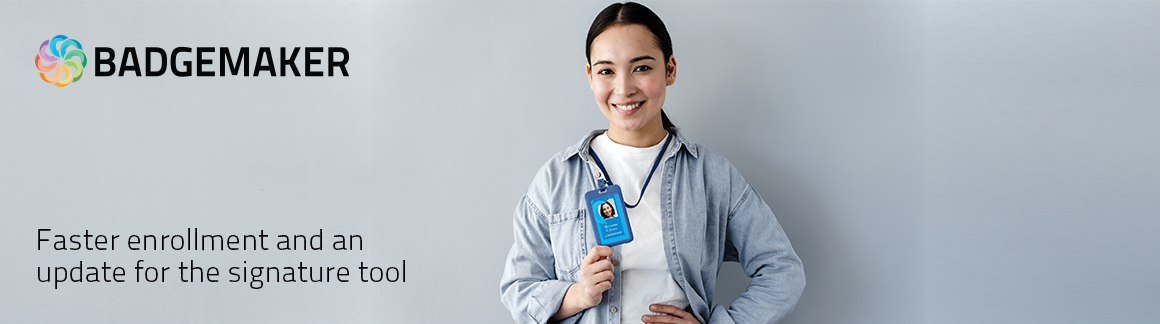
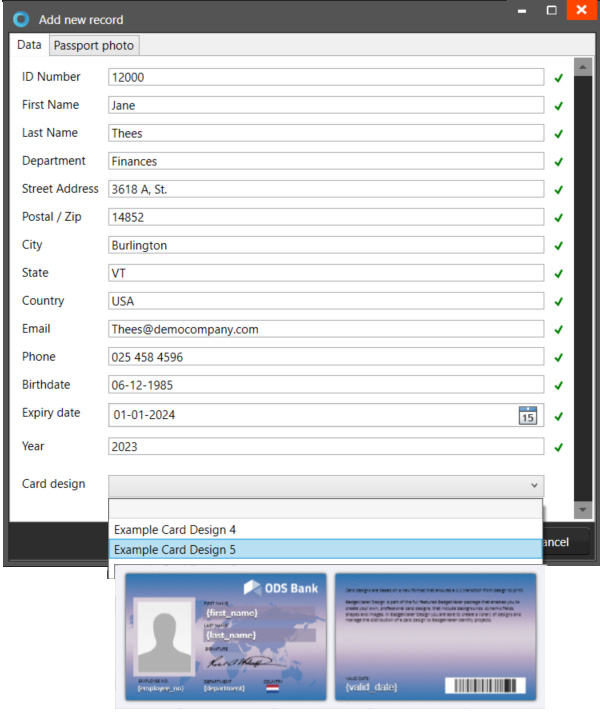
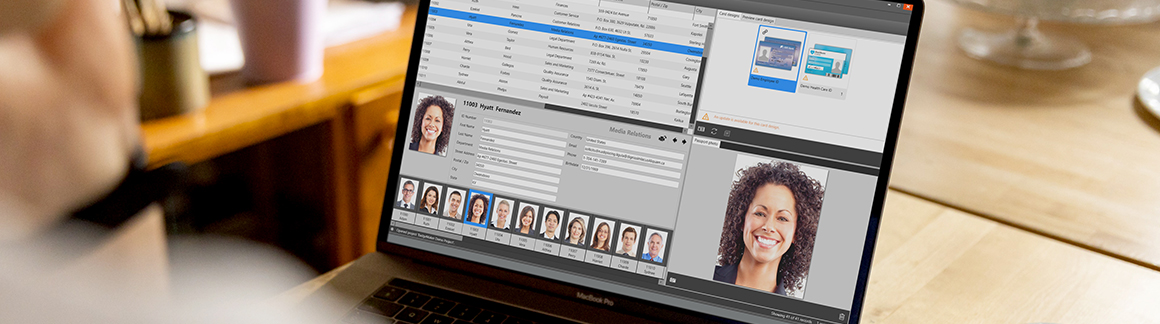
BadgeMaker 2.11 offers a new feature and a selection of improvements to enhance your card design and management experience. When creating a new record in BadgeMaker Identity, it is now possible to also select and link the record to one of the card designs available in your project. Making the enrollment process of a new cardholder faster.

Add a new record and link a card design

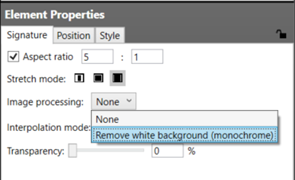
Signature toolThe 2.11 release also comes with improvements to the signature tool, added an image processing mode for signature images that treats white backgrounds as transparent, the installer and external database passwords will now be stored in encrypted form.
ScreenCheck is committed to supporting you in getting the most out of our products. Please contact us if you have any questions about the upcoming release.

BADGEMAKER RELEASE NOTES VERSION 2.11:

BadgeMaker Identity:New features* Added the ability to select a card-design when creating a new record manually.

Improvements* Installation type (all users versus single user) can now be chosen explicitly.* Uninstalling will now automatically remove the current license key, freeing up a slot for another machine.* External database passwords will now be stored in encrypted form.* Updated the file/folder selection dialogs in the data source and image source configuration views.* Added support for the ‘utf8mb3’ MySQL character set.

Fixes* Fixed that the example projects were overwritten when installing an update.* Fixed that running with admin rights would create log files that could not be written to when running without admin rights.* Fixed that MS SQL Server tables in non-default schemas could not be used.* Fixed that filtering on TEXT/NTEXT columns in MS SQL Server databases would fail.* Fixed an issue where record data would not be loaded after reopening a project.* Fixed that quick-updating a card design would ignore 2D barcode encryption key changes.* Fixed that 2D barcode encryption key IDs were not used as expected.* Fixed that switching to the designer and the store didn’t work for single-user installations.* Fixed that uninstalling would fail without an activated license key.* Fixed a regression in the add-record window.* Fixed that the UHF reader slot wasn’t available if the normal card-reader check failed.* Fixed that switching to the designer and the store didn’t work for single-user installations.BadgeMaker Design:New features* Added an image processing mode for signature images that treats white as transparent.Improvements* Installation type (all users versus single user) can now be chosen explicitly.* Uninstalling will now automatically remove the current license key, freeing up a slot for another machine.Fixes* Fixed that the example designs were overwritten when installing an update.* Fixed that running with admin rights would create log files that could not be written to when running without admin rights.* Fixed that switching to the designer and the store didn’t work for single-user installations.* Fixed that uninstalling would fail without an activated license key.

Read More

Release BadgeMaker 2.10

image

Release BadgeMaker 2.10 brings an updated User Interface for BadgeMaker Identity, offering an efficient new quick menu and improved look for the card designs overview in your project. With the 2.10 release also comes the support for the Dascom DC-7600 printer, Oracle service names, the Data Card XPS Luster ribbons, the needed fixes and some nice improvements. 

BadgeMaker 2.10

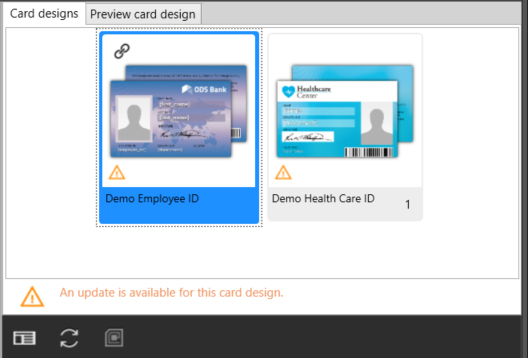
The “Card designs” tab shows an overview of the designs added and/or linked to your project. The new link icon allows you to link one or more selected records to this card design. It is also possible to unlink records with the unlink icon in the top right corner of the selected card design. Select a record and click on the “Preview card design” tab to see a preview of the card design linked to the record.

The warning icon lets you know an action is needed for this card design. Click on the card design to see which actions are needed. An action can be that an update is available for the design for example.

Update Card design BadgeMakerUpdate a card design using the update icon in the quick menu.

Go to Card Designs settings BadgeMakerThe card design icon gives a quick navigation to the card design settings of the selected card.

Go to Encode settings BadgeMakerWith the encode icon you can quickly navigate to the encode settings of the selected card. If a card design does not have encoding, the icon will be greyed out.
BADGEMAKER RELEASE NOTES VERSION 2.10:

New features
* Updated the card design preview panel with more information.
* Added support for Dascom DC-7600 printers.
* Added support for Oracle service names.
* Added support for Luster ribbons for Datacard XPS printers.

Improvements
* Added a note about support for ODBC being retracted.
* Options list values are now sorted alphabetically.
* Improved card design preview panel error reporting.
* Lowercase magstripe data is now automatically converted to uppercase, instead of causing an encoding failure.

Fixes
* Fixed that Zebra ZXP 7, 8 and 9 didn’t properly handle specialty ribbons when printing without encoding.
* Fixed that the contact slots of some Omnikey 5022 and 5027 models were recognized as contactless.
* Fixed that importing data into a Connect project would sometimes fail for certain records.
* Fixed that Example Project 1 contained a bad initial auto-increment counter value.
* Fixed that deleting biometric images would not work in certain projects.
* Fixed that Omnikey 5022 and 5027 were not recognized as contactless card-readers.
* Fixed the printer implementation preference configuration system.
* Fixed that creating empty backup files on a Desfire card would fail.
* Fixed that several operations (linking card designs, loading/deleting records, etc.) could fail with large numbers of records.
* Fixed that record data could not be loaded in Connect projects.

Read More

Release BadgeMaker 2.9

BadgeMaker Release 2.9

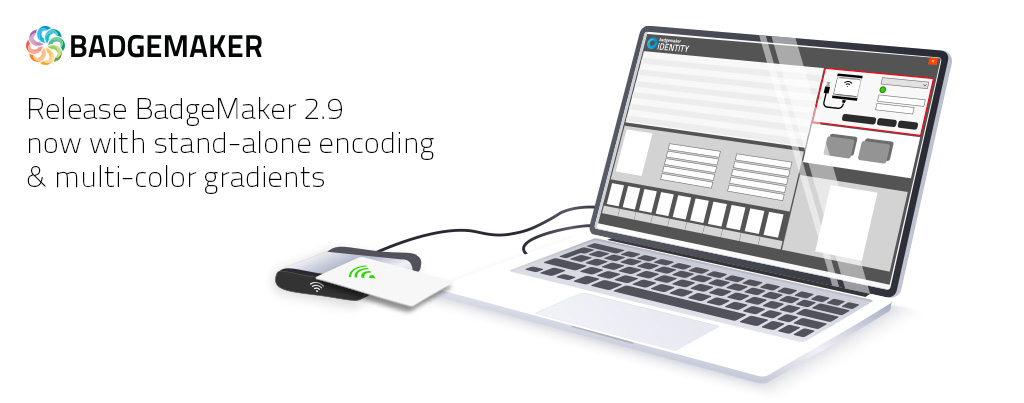
To allow for a quick search and (re)encoding of ID cards, the new BadgeMaker 2.9 release introduces stand-alone encoding.
The new stand-alone encoding feature is available with the Encode Add-On or BadgeMaker Pro.

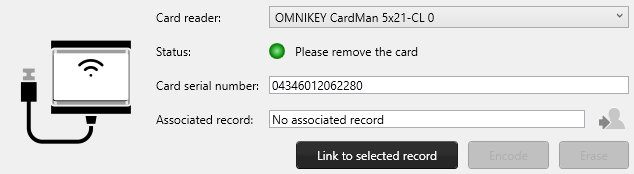
Stand-alone encoding in BadgeMakerIt allows the operator to present a new or unencoded card to an external card reader, do a quick search, select a record and encode the needed information directly to the card. Presenting a card that has previously been encoded will automatically select the corresponding record and gives the operator the option to update the card with the latest information or wipe the card if so desired.
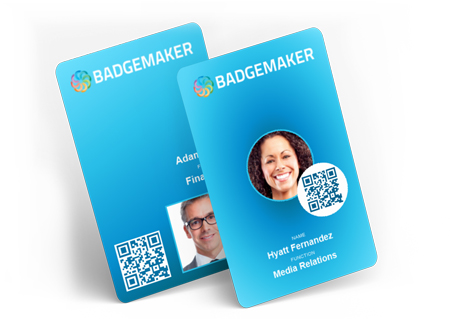
BadgeMaker mulit color gradientsNext to the stand-alone encoding we made the Italian language available for BadgeMaker users and added the option to create multi-color radial and linear gradients in BadgeMaker Design.
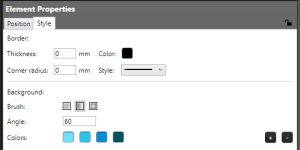
BadgeMaker gradient settingsTo create a gradient background color, click on a specific element, for example a shape-element created for the background of the card design and go to the “Style” Tab in the Element properties. Select if you would like a linear or radial gradient, the angle of the gradient and add multiple colors with the “+” button.


With the 2.9 release also come the needed fixes and some nice improvements for the user interface. Adding card designs to your project shows a better preview for example.

Release Notes


New features
* Added support for stand-alone encoding.
* Added Italian translation.
* Added support for linear and radial gradient background colors in card designs.
* Added support for the Fargo DTC4500e

Improvements
* Improved error handling when creating a new project from an Excel or csv file.
* Improved project settings UI.

Fixes
* Fixed a problem with webcam capturing not working on certain systems.
* Fixed that constant values in triggers weren’t validated.
* Fixed that HF readers in ZC printers were not resolved correctly, preventing encoding.
* Fixed that UHF encoding would be skipped for CCIs that only contained data for the EPC bank.
* Fixed that JPEG EXIF orientation meta-data was being ignored.
* Fixed a rare licensing check issue, where license keys were erroneously seen as disabled.
* Fixed a BCD encoding problem for UHF chip configurations.
* Fixed an error that occurred with certain Oracle databases (ORA-64219: invalid LOB locator encountered).
* Fixed that the installer didn’t run the Elatec driver installer when enabled.
* Fixed several rare crashes based on telemetry crash reports.
* Fixed that Codabar patterns for B and C were swapped, and that the + pattern was incorrect.
* Fixed that date formats didn’t have an effect in Mifare Classic CCIs.
* Fixed a rare IDP Solid print failure when printing colored text.

Read More

Release BadgeMaker 2.8

BadgeMaker Release 2.8

ScreenCheck is pleased to announce the new release of BadgeMaker version 2.8. The new release will be made availabe for download today on this website. Our existing BadgeMaker customers will also receive a request to update to the 2.8 version when they start their Badgemaker Software.

BadgeMaker BaseThe BadgeMaker 2.8 release offers, besides the improvement of existing functionalities, an extension of the encoding functionalities, which now also includes support for Prox, iClass and UHF Gen2 cards.

Badgemaker Premium Projects

In addition to the encoding extension, you can now also shop in the BadgeMaker 2.8 Store. Select, pay and download new premium card designs and projects in BadgeMaker. The Store is now available in both BadgeMaker Design and BadgeMaker Identity. A product from the Store, such as a downloaded project, is automatically opened in BadgeMaker Identity and a card design in BadgeMaker Design.

ScreenCheck is committed to supporting you in getting the most out of our products.
Please contact us if you have any questions about the new release.

View the Badgemaker 2.8 release notes for more information, such as the improvements of certain functionalities.


BADGEMAKER RELEASE NOTES VERSION 2.8:

New features for BadgeMaker Identity

  • Added a menu link to the BadgeMaker store.
  • Added support for MySQL 8 databases.
  • Added support for prox-card card number reading.
  • Added a new trigger type: setting card number (PACS).
  • Added support for CX-7600 printers.
  • Added support for UHF Gen2 card encoding with Zebra ZXP7 printers.
  • Added support for UHF Gen2 card encoding with ThingMagic readers.
  • Added support for iCLASS encoding with Omnikey readers (card number reading only).
  • Added support for iCLASS card number reading with Elatec TWN4 and Omnikey 5×22 and 5×27 readers.
  • Added support for Elatec TWN4 readers with Magicard firmware.
  • Added support for 64-bit MS Access runtimes.

Improvements for BadgeMaker Identity

  • Printing will now fall back to default printer settings if user-specific settings cannot be obtained.
  • Improved detection of printer status.
  • Updated Matica XID 8300 support to work with the latest EDIsecure drivers.

Fixes for BadgeMaker Identity

  • BadgeMaker can now be closed, even when there are pending print jobs.
  • Fixed a problem that prevented printing with Zebra ZC network printers.
  • Fixed a problem that prevented printing with Evolis Avansia printers.
  • Fixed that the configuration file would be ignored under certain circumstances.
  • Fixed a problem where invalid triggers could prevent project settings from being saved.
  • Fixed a querying problem with certain MS SQL Server databases.
  • Fixed a problem with Telepen numerical packing.
  • Fixed a Mifare Classic/Plus MAD v2 encoding bug.
  • Fixed a text layout bug with cursive and abugida scripts (such as Arabic, Hindi).
  • Fixed a problem with IDP Solid printers printing colored text as black text.

New features for BadgeMaker Design

  • Added support for designs with a right-to-left write direction.
  • Added a file encoding setting to the BadgeCreator importer.
  • Added a new stretch mode for images, and added stretch mode support for passport photo and signature elements.
  • Added a new dynamic field format that enables the use of certain control characters in barcodes.

Improvements for BadgeMaker Design

  • Updated the BadgeMaker store.

Fixes for BadgeMaker Design

  • Fixed that a fixed aspect ratio wasn’t applied correctly to elements with a border.
  • Fixed an element snapping bug in portrait designs.
  • Fixed that magstripe elements were not editable in single-sided designs.
  • Fixed that magstripe elements were not editable in single-sided designs.
  • Fixed that fonts that were only installed for the current user weren’t listed.
  • Fixed that the BadgeCreator importer didn’t import barcode colors.
  • Fixed a text layout bug with cursive and abugida scripts (such as Arabic, Hindi).
Read More